
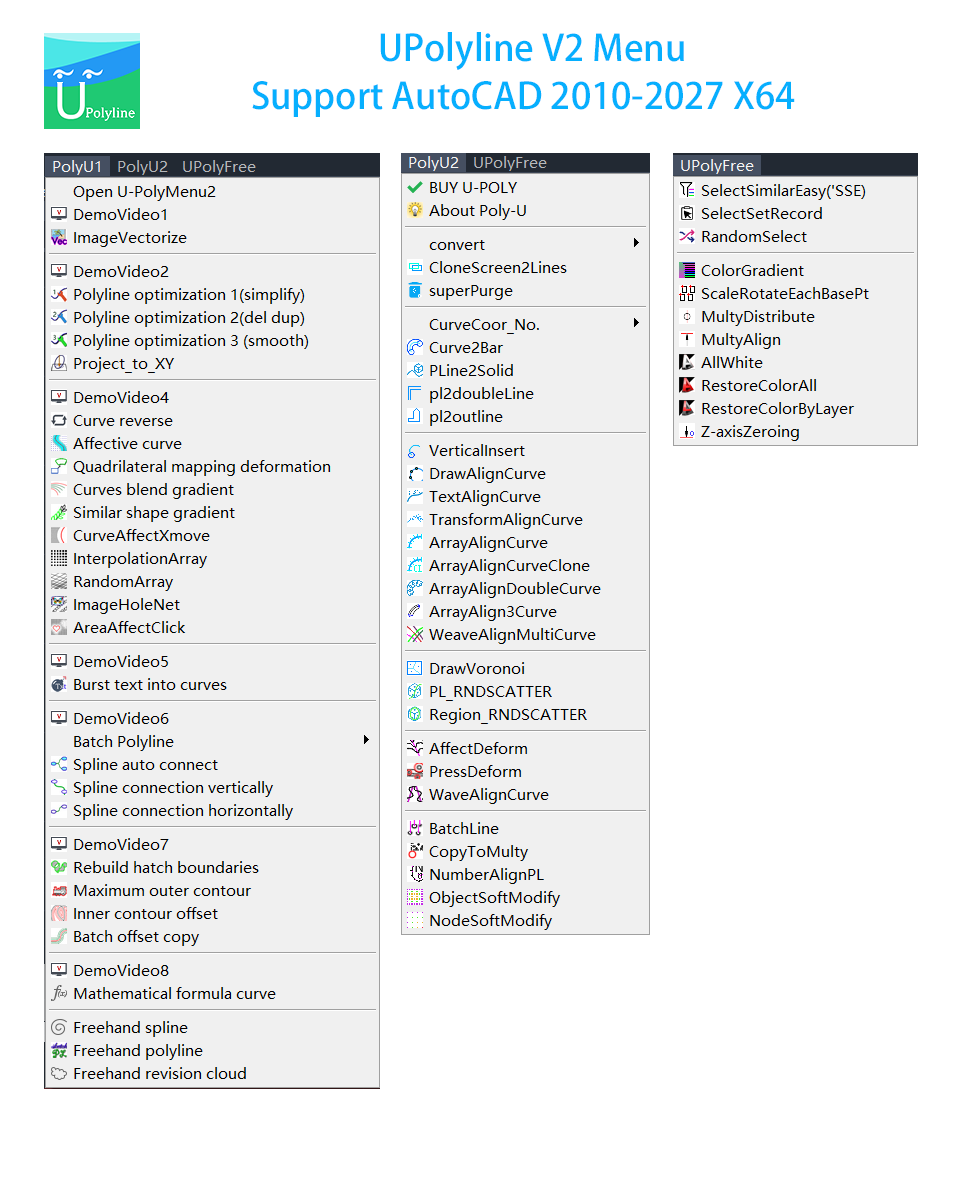
feature families
AutoCAD Plugin for Curve-Driven Design
Shape polylines into faster, smarter creative workflows.
UPolyline is a modern CAD plugin focused on polyline creation, curve transformation, curve-aligned arrays, random distribution, statistics, and batch drafting efficiency. It turns repetitive geometry work into controllable visual logic.
Support AutoCAD 2010-2027 x64
2D + 3D Friendly
Pure Efficiency + Creative Control
Menu Architecture
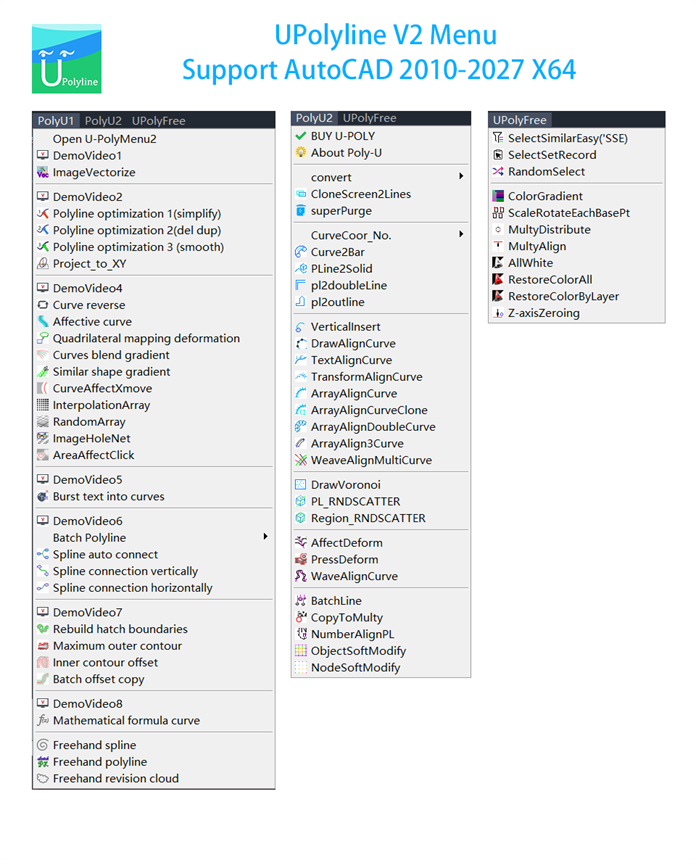
00:00 / 00:00
workflow scenes highlighted
core commands recommended
AutoCAD compatibility range
Why UPolyline
Designed for complex drafting without a complex interface.
UPolyline combines command-driven accuracy with visual creativity. It supports screen cloning, curve arrays, deformation tools, Voronoi generation, soft modification, statistics, and batch operations in one coherent toolkit.

Rebuild 2D from screen display
Clone visible 3D geometry into editable 2D blocks and linework for layout extraction and drawing cleanup.

Array along single or multiple curves
Distribute objects with spacing, scale, rotation, and directional control for decorative and engineering patterns.

Deform geometry with intent
Map shapes to guide curves, add wave logic, affect targets with force curves, or build transitions between contours.

Put text on paths
Arrange labels and annotations along curves while keeping spacing, direction, and readability under control.

Soft-modify objects and nodes
Create gradual changes in scale, movement, and rotation to form rhythmic surfaces and field-like structures.

Generate Voronoi structures
Produce Voronoi cells with optional circles or ellipses inside boundaries for façade and conceptual geometry work.
From drafting repetition to reusable geometric strategy
Instead of repeating low-value clicks, teams can define relationships between curves, objects, text, and batches. UPolyline converts design logic into operations that stay editable and scalable.
- Accelerates curve editing, conversion, and reconstruction.
- Supports both creative patterns and technical drafting tasks.
- Outputs editable blocks and reports where needed.
- Bridges 2D drafting with 3D-oriented display workflows.
Best suited for
Architectural drafting, façade pattern exploration, landscape layout, decorative detailing, production drawings, visual concept development, and repeated CAD data organization.
Architecture
Landscape
Interior
Industrial Drawing
Workflow Story
Typical path from geometry to output.
UPolyline fits naturally into a production sequence where geometry is created, distributed, refined, labeled, counted, and exported.
01. Generate or import curves
Use formulas, conversions, vectorization, or manual drawing as the geometric base.
02. Build structure with array and transform tools
Align objects to curves, map shapes, create gradients, and form controllable variation.
03. Refine with random, soft, or affective modification
Add visual richness while preserving a repeatable underlying logic.
04. Label, count, and batch-output
Attach curve text, number polylines, export statistics, and organize batch operations for documentation.